


EMBER-8 brings hybrid synthesis to the MPC Sample
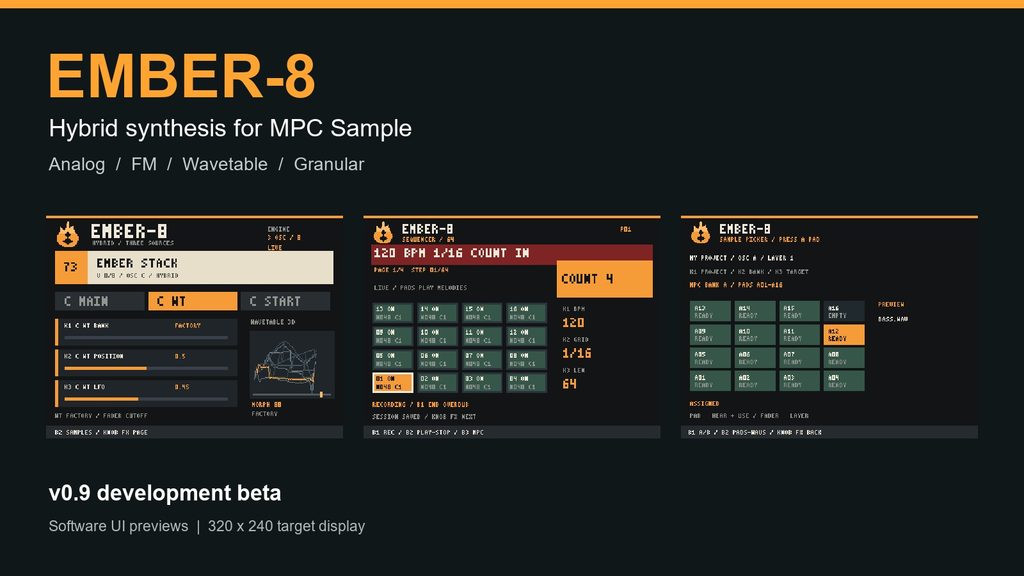
Once a drum pattern and its samples are in place, the next idea is often a bass line, a chord or a moving texture. EMBER-8 is an independent synthesizer project for the MPC Sample, built around that moment: hear the beat, try a sound and turn a synth sequence into a sample that can join the project.
Version 0.9 brings together three configurable sound sources, eight-voice polyphony, a 64-step live sequencer and a simpler sample selection and export workflow. It is a development beta, with important timing and hardware checks still ahead.
Three sources and four synthesis types
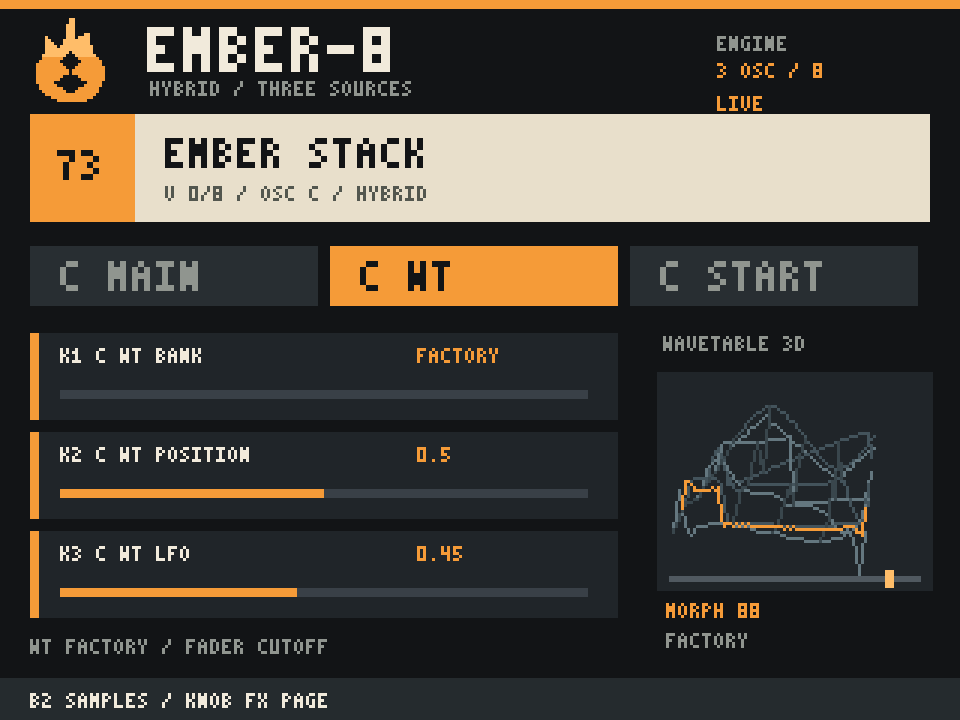
EMBER-8 has three source slots, A, B and C. Each can use Analog, FM, Wavetable or Granular synthesis, or be switched off. That makes it possible to combine a simple sine bass with an FM edge and a quiet granular texture in one patch. Eight voices are shared across the whole instrument.
The Analog source offers saw, pulse, triangle and sine waves, with pulse-width modulation. FM uses four operators and four selectable routing algorithms. Wavetable provides position and scan controls with an animated perspective display. Granular works with short pieces of source audio, exposing grain size, density, spray, position and reverse.
Use the samples already on your pads
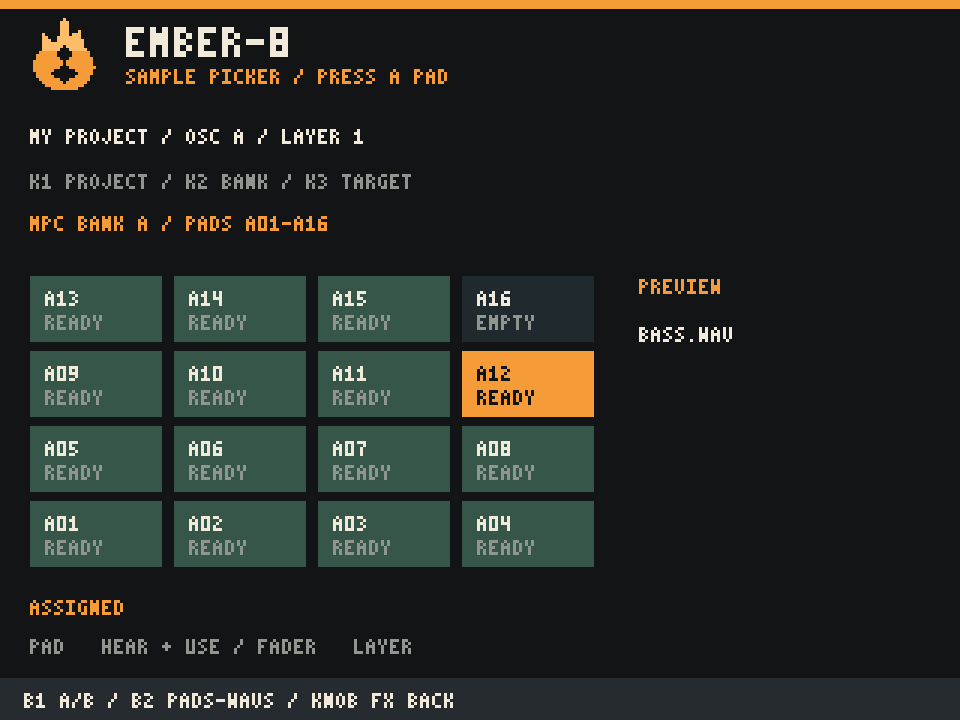
For Wavetable and Granular, the sample picker is designed around the existing MPC project. Save a project on the SD card, open SAMPLES from the oscillator editor and press a pad. The mod reads the saved pad assignment, loads the source and auditions it automatically. Project, track, A/B bank, layer and destination oscillator remain selectable.
There are also eight original generated WAV sources: Warm Saw, Hollow Pulse, Vowel Sweep, Metal Bells, Tape Grains, Air Texture, Plucked Keys and Motion Cloud. They provide starting material without requiring a separate sample collection.
Preview plays raw source audio and stays outside the pattern and exported WAV. The resulting Wavetable sound can differ substantially because the audio is resynthesized into periodic frames. Pad effects and other MPC sample processing are not printed into the imported source.
Play a melody instead of programming every step
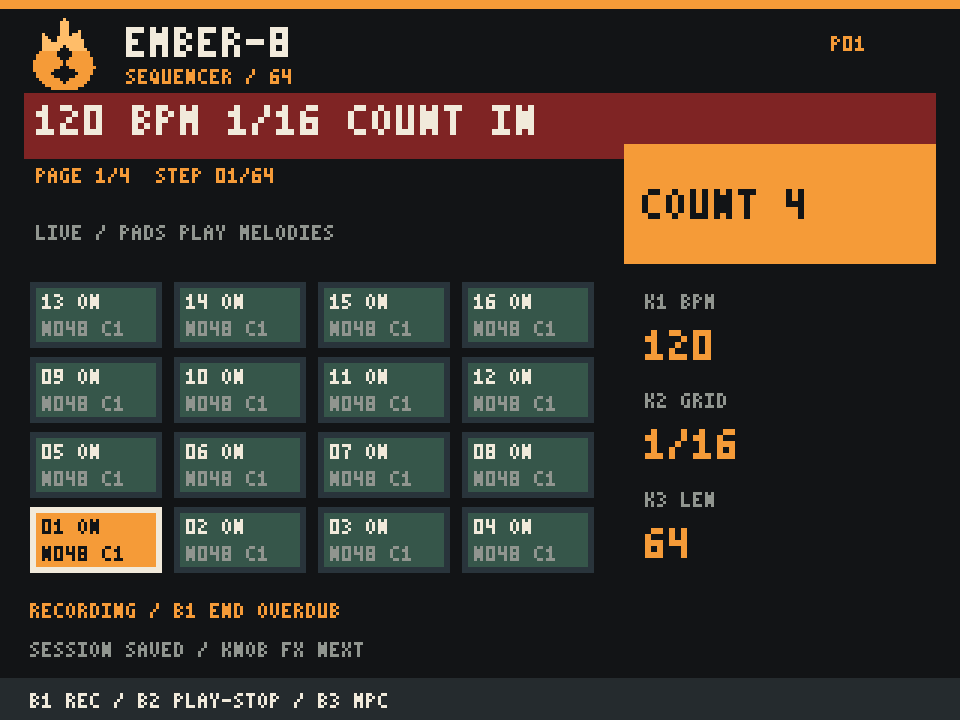
The sequencer supports live input from the sixteen pads or a MIDI keyboard. On LIVE, B1 starts recording with the selected count-in. Play the part, let it loop to overdub, then press B1 again to stop writing while playback continues. B2 controls playback. A separate STEP EDIT mode keeps step programming available without turning the LIVE pads into switches.
Patterns can contain up to 64 steps, with up to eight note starts per step. Fifteen rhythmic grids cover straight, triplet and dotted values from quarter notes through 1/64. A 64-step pattern at straight 1/16 is four bars of 4/4; finer grids make that same step count shorter.
One finished loop becomes a WAV
SAVE WAV is now an explicit action. Press B1 on that page and the synth starts at step one, clears previous voices and effect tails, and exports one complete loop. Wait for WAV READY, return to the normal MPC view with B3 and load the file through the MPC sample browser onto a free pad.
The stereo 44.1 kHz PCM16 files are named SEQ-001.wav, SEQ-002.wav and so on under EMBER-8/Exports. They contain the synth and its effects, with no MPC beat, click or sample preview. Export does not automatically assign a file to a pad.
Movement effects and a personal library
Four modulation routes connect the LFO, envelopes, velocity, Mod Wheel or Channel Pressure to shared destinations such as cutoff, pitch, FM depth and Wavetable position. A 20-figure arpeggiator adds patterns beyond basic up and down. Chorus, drive, delay and reverb shape the result, while Brightness, Movement, Bite and Space provide four performance macros.
The factory collection contains 88 presets across Analog, FM, Wavetable, Hybrid and Granular families. A 32-slot user library allows sounds to be named, saved and loaded directly on the MPC. Sequence settings are retained in session snapshots.
Where the beta stands
Earlier device tests confirmed that the original MPC beat and synth could sound together. The v0.9 source has passed 25 desktop tests, both ARM64 builds and package checks. Those checks do not establish performance or stability on the hardware; the latest workflow still needs a device test.
The key missing piece is automatic tempo and transport synchronization. The synth can be heard alongside a beat, but its sequencer is not yet locked to the MPC clock. Matching BPM and starting by hand can drift. Reliable synchronized recording remains a development goal.
Loading and deliberate unloading currently restart the MPC application. Normal view changes use buttons and do not require removing the SD card. Cold-boot autorun reliability and USB MIDI host power also remain open checks. Save the MPC project first and treat this as experimental software.
EMBER-8 is an independent project and is not an Akai product or an official MPC plug-in. The current workflow does not modify the original firmware or internal storage.
Installing EMBER-8
- Check the MPC. Start the MPC without the EMBER-8 card. Hold SHIFT and press PAD 8 (MIDI CONFIG). The top right of the display must show v1.3.0. The full firmware version is 1.3.0.12, but the display only shows v1.3.0. This is the required firmware. (When EMBER-8 is running, the EMBER-8 version is displayed instead.)
- Save Your Work. Before installing or starting EMBER-8, make sure to save all your projects and back up any important data.
- Copy. Unzip the downloaded file. Copy the
autorunfolder onto a microSD card formatted as exFAT. Safely eject the card. - Start. Turn off the MPC, insert the microSD card, and turn the MPC back on. EMBER-8 starts automatically. No buttons need to be pressed.
Important Notes & Disclaimer
- Use at your own risk. EMBER-8 is an unofficial modification. The developer assumes no responsibility for data loss, malfunction, or damage.
- No firmware flashing required. EMBER-8 runs directly from the microSD card and is not flashed or permanently installed onto the MPC Sample.
- Original firmware remains intact. Simply remove the EMBER-8 microSD card and restart the MPC Sample to boot into the original firmware.
- Always save your projects before launching EMBER-8.
Push “PAD FX” and “KNOB FX” together to get into Synthesizer Mode
The MPC Sample will start once again, so please wait after turning the MPC on. MPC will then restart